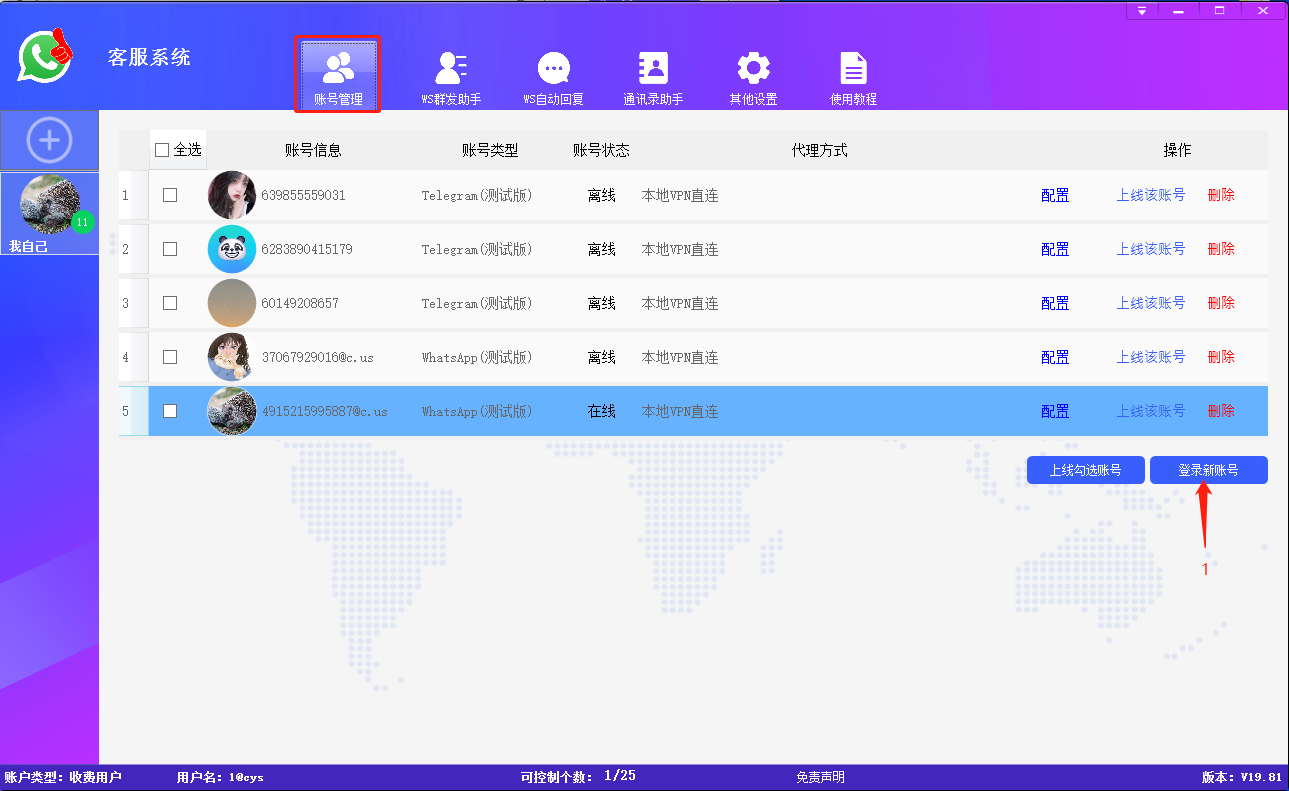
# 账号管理

**账号管理：**&#x901A;过扫码登录的方式登录多个WhatsApp、Telegram、Line账号实现了账号多开，统一化管理多个账号。支持配置不同国家ip代理登录，使用本地vpn直连、使用Http/Socks5代理IP、使用Rola-ip平台IP。

支持配置不同IP代理进行登录：使用本地vpn代理、使用Http/Socks5代理。\
1.使用本地VPN直连：当前登录的号使用本地VPN所在的ip(VPN软件需要开启全局模式） \
2.使用Http/Sock5代理IP：导入Http或者Sock5格式的ip并使用 <br>

**登录新账号：**&#x70B9;击【登录新账号】，软件支持登录WhatsApp账号或者Line账号，成功登录后，WhatsApp账号的缓存信息会保存至软件的账号管理列表中（目前Line账号缓存信息无法保存至账号列表中）:arrow\_down:

<mark style="color:red;">点击跳转</mark>:arrow\_right:[扫码登录WhatsApp(Web网页版)](/kefu/zhang-hao-guan-li/sao-ma-deng-lu-whatsappweb-wang-ye-ban.md)<mark style="color:red;">苹果手机和安卓手机方法</mark>\ <mark style="color:red;">点击跳转</mark>:arrow\_right:[扫码登录Line](/kefu/zhang-hao-guan-li/sao-ma-deng-lu-line.md) <mark style="color:red;">苹果手机和安卓手机操作方法</mark>

扫码登录成功的WhatsApp账号会保存账号信息列表中，便于下次缓存登录和管理:arrow\_down:

<figure><img src="/files/bmgjoeHVhwtQS7v5cKkz" alt=""><figcaption></figcaption></figure>

上线WhatsApp账号，添加备注

<figure><img src="/files/9Ml6SO95cnhZxHHRzMse" alt=""><figcaption></figcaption></figure>

客服系统支持配置不同国家代理ip登录账号，使用本地vpn直连、使用Http/Socks5代理IP、使用Rola-ip平台IP

使用Http/Socks5代理IP--Http/Https协议类型:arrow\_down:

<figure><img src="/files/mygxir7Nnd3Ofa3esi6B" alt=""><figcaption></figcaption></figure>

<figure><img src="/files/6kILU7TA14QS6UEZ87yi" alt=""><figcaption></figcaption></figure>

使用Http/Socks5代理IP--Socks5协议类型:arrow\_down:

<figure><img src="/files/mygxir7Nnd3Ofa3esi6B" alt=""><figcaption></figcaption></figure>

<figure><img src="/files/mOxw3XQNzZUsVtesPGPe" alt=""><figcaption></figcaption></figure>

<figure><img src="/files/mygxir7Nnd3Ofa3esi6B" alt=""><figcaption></figcaption></figure>


---

# Agent Instructions: Querying This Documentation

If you need additional information that is not directly available in this page, you can query the documentation dynamically by asking a question.

Perform an HTTP GET request on the current page URL with the `ask` query parameter:

```
GET https://help.kuajingwang.vip/kefu/zhang-hao-guan-li.md?ask=<question>
```

The question should be specific, self-contained, and written in natural language.
The response will contain a direct answer to the question and relevant excerpts and sources from the documentation.

Use this mechanism when the answer is not explicitly present in the current page, you need clarification or additional context, or you want to retrieve related documentation sections.